
 Operation Search
Write Date
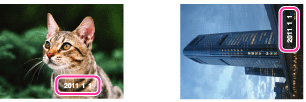
Sets whether to record a shooting date on the still image.
-
Set the camera to shooting mode.
-
MENU

 (Settings)
 (Shooting Settings) [Write Date] desired mode

 |
Off
|
Does not record a shooting date.
|
|
|
On (
 ) ) |
Records a shooting date.
When [On] is selected, the
mark will appear on the bottom right of the screen while shooting.However, in some shooting modes that cannot record dates on images, the
mark will disappear. |
Notes
-
You cannot record dates in the following situations:
-
In Movie Mode
-
In Dual Rec mode
-
In iSweep Panorama
-
In Burst shooting mode
-
In Easy Mode
-
In 3D shooting mode
-
If you shot images with the date once, you cannot delete the date from the images later.
-
The dates are doubly printed, if you set the camera to superimpose the dates when printing.
-
The recorded time of the image cannot be superimposed on the image.
