
 Operation Search
Position Information (DSC-TX100V only)
GPS triangulating status can be checked. During displaying the GPS triangulating status, GPS is easy to triangulate to be set the camera.
-
MENU

 (Position Information)

Displays the triangulating information on the screen.
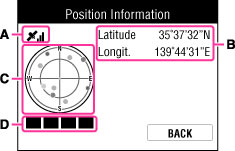
On the GPS indicators
The indicator (A) changes according to the strength of GPS signal reception when GPS is activated.
|
GPS indicators
|
Triangulating status
|
GPS reception status
|
|
No indicator
|
Off
|
[GPS setting] is set to [Off] or an error occurred.
|
 |
Difficult
|
Your camera cannot find a GPS signal, therefore, it cannot acquire location information. Use your camera in an open area.
|


 |
Searching
|
Searching for GPS satellites. It may take several minutes to start triangulating.
|


 |
Triangulating
|
During GPS triangulating, displays latitude / longitude (B).
|
Satellite and positioning indicators
Satellite position and acquiring status of orbital information (C) can be checked on the position information display. Up to 4 indicators which show satellite information-acquiring status are displayed on the positioning indicator (D).
The color of satellite indicator and positioning indicator change according to the positioning status. Green-colored indicator shows that camera is triangulating.
Notes
-
If the GPS signal can be received from several satellites, depending on the situation, the correct shooting direction may not be recorded, displayed or taken a time.
-
In searching the satellite positions, or triangulating, its may fail when you put your fingers on the GPS receiver.
Related Topic
