
 Operation Search
Focus
-
MENU

 (Focus) desired mode

 |
(Multi AF) |
Focuses on a subject in all ranges of the finder frame automatically.
When you press the shutter button halfway down in still image shooting mode, a green frame is displayed around the area that is in focus.

|
|
|
 (Center AF) (Center AF) |
Focuses on a subject in the center of the finder frame automatically. Using the AF lock function together, you can compose the image the way you want.
 |
|
|
 (Spot AF) (Spot AF) |
Focuses on an extremely small subject or a narrow area automatically. Using the AF lock function together, you can compose the image the way you want.

|
 (Underwater), focus operation is adjusted to underwater shooting. When focus is achieved by half pressing the shutter button, a large frame is displayed in green (DSC-TX10).
-
When you use [Digital Zoom] or [AF Illuminator], the AF range finder frame is disabled and appears in a dotted line. In this case, the camera works to focus on the subjects at the center of the screen.
-
When the focus mode is set to other than [Multi AF], you cannot use the Face Detection function.
-
If Tracking focus is activated, the camera focuses with priority on the subject to be tracked.
-
You may not be able to set some MENU items depending on the selected REC mode. For details, see “MENU items not available in some REC modes.” [Details]
 Quickly choosing the priority subject
 to release the focus.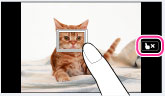
Focusing on subjects near the edge of the screen

-
Recompose the shot so that the subject is centered in the AF range finder (A), and press the shutter button halfway to focus on the subject (AF lock).
-
When the AE/AF lock indicator (B) stops flashing and remains on, return to the fully composed shot, and press the shutter button fully down.
-
As long as you do not press the shutter button fully down, you can retry the procedure as many times as necessary.
