
 Operation Search
EV
You can adjust the exposure manually in 1/3 EV steps in a range of –2.0 EV to +2.0 EV.
-
MENU

 (EV)
(EV)
Depending on the REC mode, this is set using buttons displayed on the left side of the screen.

-
Touch
 /
/  to adjust exposure [OK].
You can also adjust the exposure by touching  of the adjustment bar and dragging to the right or left.
of the adjustment bar and dragging to the right or left.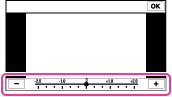
 Adjusting the exposure for better looking images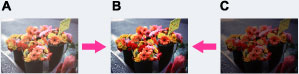
A: Overexposure (too much light)
B: Correct exposure
C: Underexposure (not enough light)
Notes
-
If you shoot a subject in extremely bright or dark conditions, or when you use the flash, the exposure adjustment may not be effective.
-
You may not be able to set some MENU items depending on the selected REC mode. For details, see “MENU items not available in some REC modes.” [Details]
